Canvas Brush Font: A Hand-Brushed Review for Makers
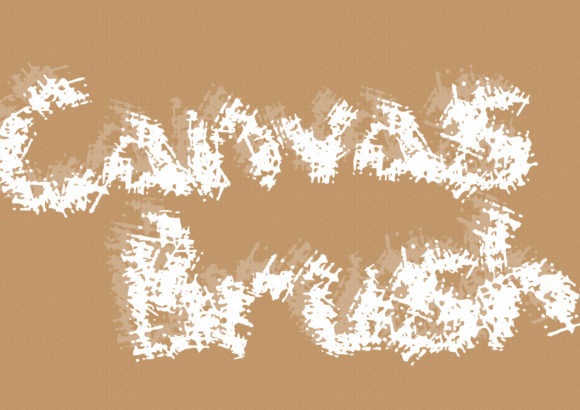
Last Tuesday, I sat down with a fresh batch of soy wax and a sheet of kraft labels, trying to find a font that could carry the scent of cedar and vanilla without saying a single word. I've tested dozens of display fonts over the years, but few capture that quiet, handcrafted honesty the way Canvas Brush does. This hand-brushed display font has a texture that feels lifted straight from a sign painter’s kit — organic, unpolished in all the right places, and surprisingly versatile for product-based work. Over the past few weeks, I've used it across candle labels, sticker sheets, wedding invitation mockups, and a run of tote bag transfers. Here’s how it performed on real materials and where I think it truly shines for makers and shop owners.
Canvas Brush for Handmade Candle Labels and Product Branding
When I think about where Canvas Brush belongs in a maker’s toolkit, candle labels come first. The font’s hand-brushed personality turns a simple black-and-white label into something that looks intentionally small-batch. I tested it on a 3-inch round label for a bergamot-and-herb candle, setting the scent name in large title case with a whisper of letter-spacing. The irregular edges of the characters caught the kraft paper texture beautifully, and even on a home laser printer, the strokes held enough weight to stay readable at arm’s length. For product lines that depend on emotional warmth — think apothecary, slow-made skincare, or pantry goods — a display font like this communicates handmade trust faster than any badge or stamp.
I also mocked up a few boutique hang tags and soap sleeve wrappers. Because Canvas Brush sits proudly in the Display category, it’s built for short, punchy lines rather than ingredient lists. I kept the font strictly to product names, fragrance titles, and tiny decorative phrases like “small batch” or “hand poured.” The result felt elevated but approachable, as if someone had signed each wrapper by hand. For sellers who rely on brand consistency across multiple product SKUs, sticking to one signature display font across all primary product names can quietly tie a whole catalog together.
Using Canvas Brush on Wedding Invitations and Event Stationery
Stationery is where Canvas Brush truly performs as a romantic, editorial-grade design asset. I pulled up a 5x7 invitation suite mockup and set the couple's names in the font at about 40 points, pairing it with a clean sans serif for the secondary details. Instantly, the design shifted from generic template to something I could see in a bridal shop portfolio. The brush strokes have a dry, tactile quality that pairs wonderfully with deckled-edge paper and botanical illustrations. It’s a display font that feels authentic for modern rustic weddings, outdoor ceremonies, or anything with a laid-back elegance.
I also tested Canvas Brush on welcome signs, escort cards, and table numbers. For these larger pieces, the font scaled up without losing its hand-painted character — the slight variations in stroke thickness gave each numeral or letter its own personality. When used on printed cardstock or even foam board signage, the edges stayed defined without turning muddy. One caution from my testing: at very small sizes on escort cards (under 18 points), some fine brush details started to fill in on my inkjet printer. I’d reserve this Font for names at a minimum of 22 points on physical prints, especially if you’re printing at home rather than through a professional press.
Canvas Brush for Printable Wall Art and Digital Downloads
Printable creators, this is where you’ll likely see immediate value. I built a quick “home sweet home” art print for a living room gallery wall using Canvas Brush as the hero phrase, and the organic texture made the letters feel like a hand-lettered commission. Because the font comes with a natural baseline variation, it sidesteps the mechanical look that many craft fonts fall into. For farmhouse-style wall art, motivational quote prints, or nursery name signs, this display typeface delivers that sought-after human touch without endless manual digitizing.
On the digital download side, the file held up well inside both Photoshop mockups and Canva uploads. I used it to produce listing previews for an Etsy shop, and the font’s distinct personality helped the product images feel cohesive. When layered over linen backdrops or watercolor textures, Canvas Brush took on a soft, artistic quality that I think buyers in the printable decor niche respond to. I also checked the glyphs for common decorative elements like ampersands and numerals — the ampersand is especially charming and could easily anchor a secondary design element on its own.
Readability and Cutting Machine Tips for Canvas Brush
Testing Canvas Brush with a Cricut Maker 3 was a learning curve, but a rewarding one. On a tote bag project using heat-transfer vinyl, I set a single-word phrase at about six inches wide. The weed lines held up well for the most part — the slightly roughened edges of the brush strokes actually minimized the appearance of small weeding imperfections, which is a bonus for dark vinyl on light canvas. For mug designs and small tag cuts under three inches, I’d recommend thickening the cut line slightly in your design software or opting for bold display Fonts rather than this one. The fine, dry-brush hairlines can become delicate little islands that are tricky to weed if the size drops too far.
On hard surfaces like wooden signs and painted boards, the font translates wonderfully. I projected a design onto a reclaimed wood piece, traced it with a paint pen, and the irregular strokes looked intentionally hand-painted. If you’re a small shop owner who uses signage at markets or craft fairs, having Canvas Brush in your collection means you can maintain that custom-painted look across all your signage without hiring a calligrapher every season. For stickers and decals, I’d stick to kiss-cut sheets where individual letters aren’t expected to hold intricate interior cuts on their own.
Font Pairings That Complement Canvas Brush
Almost every display font needs a dependable partner, and Canvas Brush is no exception. Through trial and error across label sheets and invitation suites, I found that simple sans serif families — think Open Sans, Montserrat, or Futura — offer a clean counterbalance to the font’s textured nature. The combination works because the sans serif handles all the functional information (dates, ingredients, shop URLs) while the display font carries the emotion. For softer projects, a delicate handwritten script can sit beneath a Canvas Brush title to create a layered, romantic composition that works beautifully for wedding suites or greeting cards.
I also tested pairing Canvas Brush with a light serif for editorial-style covers and lookbook pages. The serif’s structure brought a touch of refinement, and the contrast between smooth serif letterforms and the rough brush texture felt intentional — ideal for creative Fonts collections, design portfolios, or even social media graphics where you want a hint of editorial polish. One thing I wouldn’t do is pair it with another heavily textured display font; the two start to compete and the design loses its focal point.
Understanding Commercial Use and Production-Ready Details
Before printing on merchandise or bundling into template shops, it’s essential to verify what’s included. With any hand-brushed design asset, I always check character sets, multilingual support, and licensing terms. For Canvas Brush, I tested the basic Latin set across product names in English, French, and Spanish; all displayed cleanly without missing glyphs. If you plan to sell physical products — mugs, shirts, tote bags, stickers — or offer downloadable templates that incorporate the font, make sure your license covers commercial use. Most premium display Fonts come with a standard desktop license, but extended commercial or server-based licenses are often required for digital downloads, print-on-demand applications, or trademarked branding.
File formats matter too. I worked comfortably with OTF files in both Silhouette Studio and Adobe Illustrator. If you’re using web-based design platforms, confirm that the uploaded font renders correctly across mockups and download previews. I didn’t test variable font settings or extensive OpenType features here — this is a focused, purpose-built display font, and its strength comes from the raw brushwork rather than a massive weight family. That simplicity actually makes it easier to use straight out of the folder, which for busy makers is a quiet but significant advantage.